
Writing prompt for chatgpt photo editing to produce a photo seems easy enough to write up, until you actually do it. You can write a prompt such as, “a portrait of a woman in soft light.” You will then receive a technically correct but utterly uninspired, dead flat, totally unmemorable portrait with no soul that looks like some out-of-date stock photo from 2011. This is not a tool failing; it’s a prompt failing.
Bridging the gap between a rubbish AI-generated photo and something that actually looks deliberate, cinematic, or usable relies entirely on your ChatGPT prompt. Lighting conditions, camera settings, atmosphere and mood, color palettes, detail in the background, lens specification-these all help to get the desired results from the AI to resemble the desired final image more accurately. This guide has tips for correctly writing those prompts, divided by genre, with full copy and pasteable examples for portraits, products, landscapes, etc.
Why chatgpt photo editing prompts decides the quality of photos
The Quality of your Photos is Dependent on the structure of your prompt for chatgpt photo editing. There is a pattern that seemed to hold across a number of my most effective generated photos, and is the general framework to approach different kinds of prompts. To make a good, effective ChatGPT photo generation prompt, there are several layers of elements working together in harmony.
Here is a set of different elements you’ll want to consider:
- Subject – Who or what is in the photo, and what state of being or pose it’s in
- Lighting: gold hour, soft box studio lighting, diffused overcast, neon lights, candlelight.
- Camera & Lens-85mm portrait lens, 24mm wide angle, macro, telephoto
- Mood or Color grade: cinematic, desaturated, warm film tone, cool editorial tone.
- Background & setting – City street, seamless white, forest, a minimalist studio space
- Technical style -Photorealistic, 8k, a shallow depth of field, film grain, raw texture
Removing 2-3 of these from your prompt makes the photo tend toward being very average. Adding more back in creates something similar to what a human photographer might take.
prompt for chatgpt photo editing for Portrait Generation
The first place (and where ambiguous prompts are most ineffective) for most people is portraiture. A “beautiful woman” tells ChatGPT virtually nothing.
Natural light portrait prompt:
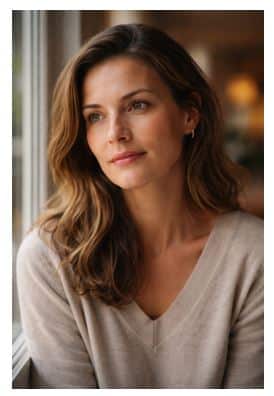
For photorealistic, try this chatgpt photo editing prompts: generate “A photorealistic portrait of a woman, late thirties, near a large window, soft diffused natural light from the left. Slightly off-camera gaze with a thoughtful and calm expression. Out of focus warm interior background in soft focus. Shot on a Canon 5D at an 85mm f1.4 lens, very soft focused, natural skin texture, hardly retouched. Warm colors and slightly desaturated colors. “
Urban street portrait prompt:
For a cinematic, generate “A cinematic street portrait of a young man wearing a worn leather jacket standing in a rain-soaked alleyway at dusk. Neon signs reflected in the wet pavement. Shot on a 50mm lens, wide aperture. Moody blue and amber color palette. Film grain texture, slight vignette. Editorial photography style, high contrast.”
Advice for better chatgpt photo editing prompts:
- Name your light source and direction.
- State whether you want the eyes in focus (usually, you should).
- Specify skin tone rendering if it’s a factor in your portrait.
- Name the emotion you’re going for: contemplation, excitement, challenge, etc.
- State your desired photographic genre: editorial, fine art, documentary, or commercial.
ChatGPT Prompts for Product Photography Generation
ChatGPT Prompts for Product Photography Generation
AI-generated product photography has now become really helpful to e-commerce teams, small businesses, and for social media content, where physical shoots might be out of reach.
Clean E-commerce Product Shot Prompt
These chatgpt photo editing prompts that can help:
“Create a photorealistic product image of a dark amber glass skincare serum bottle with a clean white seamless background and pure studio lighting coming from slightly above and right to produce a soft shadow on the left. Minimal design, no props, and shoot it from a slightly raised viewpoint showing the cap and label. Make it crisp, clear, sharp, and from an e-commerce product angle.”
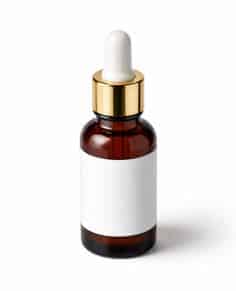
A ChatGPT prompt that is trying to resolve a very specific problem of getting a clean, high-standard marketplace product image is this one. A bit of lighting from above and slightly from the right generates depth without the shadows of the product becoming overwhelming, and a command for ‘no props’ ensures nothing competes with the product.
Product Photograph Prompt – Lifestyle
Here’s a sample ChatGPT prompt to try for this image:
An eye-level lifestyle shot displaying a matte black mug on a table next to a window on a rainy day, with the cup providing its own steam. There is a softly lit, grayish room with the cup sitting on the table next to a closed book and a tiny succulent plant. Everything in the shot appears perfectly and nonchalantly positioned in the room and was taken with a 50mm lens at f/2.8 and is warm, soft, and realistically shaded. Shot in the user’s home, not in a studio.
Product Photograph Prompt – High Fashion
Here is a sample chatgpt photo editing prompts to try for a high-fashion product photograph:
A fashion image featuring two white leather shoes. Photographed the white leather shoes angled on a glossy black marble surface. Photographed at a wide angle at a low angle with a slight fish-eye distortion. The light source is on the top left of the frame, with dark hard shadows around the shoes. The image should be pure blacks and pure whites and zero tones or gray at all. Style should be high fashion and editorial, as found in the ID magazine and Another Magazine.
prompt for chatgpt photo editing for Landscape and Nature Photo Generation
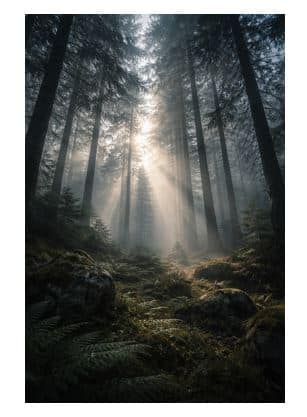
This works best when we think about the atmosphere for generation. Huge difference from “a forest” to “an afternoon in a foggy green forest with sunlight coming through trees in a specific range of color”.
The Moody Forest at Fog Prompt:
A photorealistic landscape, pine forest, dense, morning fog. The low sun angles through the trees, lighting small particles of dust and mist. Cool grey, subdued, low greens palette. Wide-angle 24mm. Low viewpoint from below, up at tree height. Long exposure. Stillness. A very quiet and cinematic feeling.
The Desert Golden Hour Prompt:
Create a photo-realistic wide desert landscape shot. Golden Hour, roughly 10 minutes before sunset. Long, clear shadows reach across the foreground sand dunes. Landscape has an amber/burnt orange gradient with a hint of violet for the distance sky at the horizon. Taken from a higher vantage, aiming down toward the landscape. The image should feel empty, vast, and pure.
ChatGPT Prompts for Architecture and Interior Photography Generation
Geometry and the interplay of light play such a big role in interior and architectural design, and both of these prompts are excellent at it.
Minimalist Interior Prompt
Try this prompt for chatgpt photo editing:
Photorealistic image of a minimalist Japanese-style living room interior. White walls with a light oak floor and a low, wooden sofa covered in linen. Place one bonsai tree on a small, stone shelf. Make sure the lighting is soft and uniform throughout the scene, with natural light coming in from a floor-to-ceiling window on the right. The scene must be completely clutter-free. Wide-angle lens. Keep the horizon perfectly straight. Shot on a wide-angle lens. Keep the horizon perfectly level. Images should appear calm, architectural, and clean.
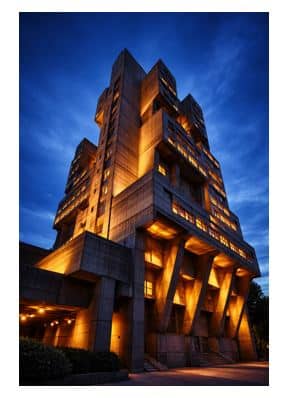
Dramatic Architecture Exterior Prompt
This ChatGPT prompt:
Create a dramatic architectural photograph of a brutalist building at blue hour. Deep navy sky behind the building, and the structure should be illuminated from below by warm amber spotlights. Use a 24mm tilt-shift lens in order to correct for perspective. Create contrast between the warm building light and cool sky. Add a long exposure effect. Lower camera angle looking up at the building.
Crafting any ChatGPT Photo Generation Prompt from Scratch
No one-size-fits-all template, but here is a reusable format applicable to any kind of photo:
- Start with the subject, define the actor/object with clear physical/visual specifics.
- Then define the light:source, direction, hardness/softness, temperature.
- Define the camera and lens to determine depth-of-field and compression effects.
- Define a singular, consistent direction for color and mood, not conflicting with them.
- Be explicit about the background or environment. “Rain-soaked alley” is better than “cityscape”.
- Reference a specific publication, genre, photographer, or period as a style indicator.
Use this on any of your ChatGPT photo generation prompts, and the output will be better immediately.
Conclusion
Photo creation in AI isn’t about discovering a silver bullet prompt you’ll use over and over. It’s about learning the structure behind what makes a ChatGPT prompt return something useful and baking that structure into every query. Light, lens, mood, and setting are not elements you choose to add: they ARE the entire job.
The photographers and designers producing the best AI-generated photos are not using longer prompts. They are using better prompts. Focus on a single category in this guide, test the sample prompt for chatgpt photo editing exactly as is, and then isolate individual elements like the light, lens, and color grade, watching each change alter the results. This is what constitutes the practice: not rote prompting but a deep understanding of how each element functions.