Best Prompt for Photo Editing in ChatGPT
The world of digital art has taken an extraordinary turn with the integration of multimodal AI functions. Those days of typing out complex commands have long passed; now we have the power of sophisticated vision models that can enhance, improve, or recreate any images we input. Having an understanding of the best prompt for photo editing in chatgpt is not only the key to someone transforming an underexposed photo into an industry-grade picture with confidence, but also understanding the interplay of descriptive keywords, specific instructions, and the AI’s understanding of space and visual cues.
As we enter 2026, we are required to be more precise when manipulating images via AI. No longer is the vague concept of “making it look better” enough for fine-tuned adjustments; in modern creation, understanding lighting, texture, color, and composition is paramount. Using the best prompts for photo editing in ChatGPT empowers an artist to access those hidden, overlooked aspects of any of their images; whether they are creating them for social media use, professional marketing material, or for personal art pieces, this article addresses those parameters necessary to create beautiful images every time.
How to build the ultimate photo editing prompt for ChatGPT.
Expert photo editing within ChatGPT works as a conduit between the user’s vision and the AI’s potential. A “prompt” isn’t really a command; it is a coordinate that tells the AI what to do.
Essential parts of a technical photo editing prompt.
● Action Verb-Specify an exact action to be performed by a verb, such as Replace, Enhance, Inpaint, and Adjust.
● Subject descriptor-Identify which elements in the photo need to be changed by you with descriptions like “the foreground’s retro blue vehicle”.
● Setting attributes-Clarify the ambient lighting condition required by defining phrases like the golden hour, neon lighting, or the softness of studio lights.
● Technical features-Incorporating technical camera terms such as aperture, an f/1.8 aperture, a long exposure, or a low ISO at 100 could produce a photorealistic depth in the photos.
Guidelines for color grading and lighting.
Lighting is arguably the most significant factor when it comes to photography, and that should be clearly expressed within both components of a prompt. Even changing the tonal range can have a massive impact on the photo.
● Ray Tracing-Ask for the simulation of ray-traced light and shadows on the metal objects within the photo.
● Volumetric lighting-Use phrases like light beams, God rays, and mists of light to introduce photographic depth.
● Color Temperature-If you need an outdoor, nostalgic atmosphere at an indoor setting, try a color temperature setting of 3200K.
Top ChatGPT Photo Editing Prompts By Category
Portrait retouching prompts
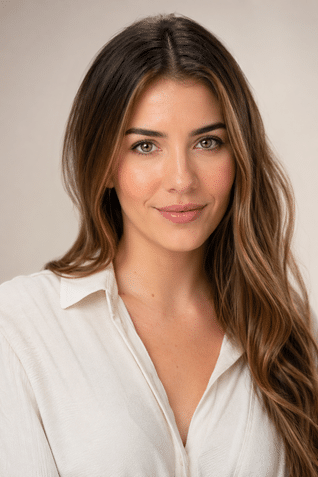
A common and popular use of AI photo editing tools is portrait editing. To create an effective and the best prompt for photo editing in chatgpt for portraits, consider those features concerning skin tone, light, and facial elements without resulting in a highly retouched photo.
Examples of effective portrait editing prompts include:
“Set this portrait in studio soft light, brighten it a little, tone down any harsh shadows on the one side of the face, and add a touch of warmth to the skin. Have the photograph look professional and polished.”
Background Editing & Replacing Prompts
One of the most frequent editing requests one would expect to be implemented into an AI photo app is that of a background change. Both the deletion of a desired background and the replacement with a different background require extremely specific prompt data to reach a desired and effective result.
Example: Good prompts contain:
Change the background in this portraiture photo to an outdoor shot of a sunset. The color profile should look like an orange and pink color profile. The subject should not look out of place, taking the lighting into consideration, considering the subject’s position relative to the background.
Prompts to correct and grade colors
Perhaps the factor that influences an edit the most is color, and the best prompt for photo editing in chatgpt, dealing with color, should always mention the colors and vibes required, along with the technical outcome.
Examples of prompts which tend to work well:
● ‘Correct the white balance. The photo was shot indoors with tungsten lighting, and the resulting yellow tones in the picture must now appear as if it were shot in natural daylight. Natural skin tone should not be affected.’
● ‘Make the photo of the landscape vibrant by increasing the richness of greens and blues and by giving a warm glow in any light source. Make sure the photograph doesn’t look like it has been over-edited.’
Product Photo Editing Prompts
E-commerce and product photography call for clean, cohesive, and professional images. AI editing, using appropriately crafted prompts, can significantly improve workflow for these images.
Prompts that performed well:
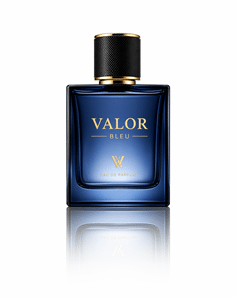
Edit this product photo for e-commerce use, remove all background elements, and have it on pure white, lighting corrected so it’s even from the front light, and the product detail is sharp.
Add a reflective surface beneath this perfume bottle product shot, ensure the reflection does not extend more than a few feet and fades naturally, and have it on a pure white background.
Style Transfer and Art Style Editing prompts
But photo editing with ChatGPT doesn’t only involve fixing imperfections. There’s a place for artistic style modifications here, where we discover the most creative ChatGPT prompts for photo editing, unlocking fantastical possibilities:
These prompts have been tested:
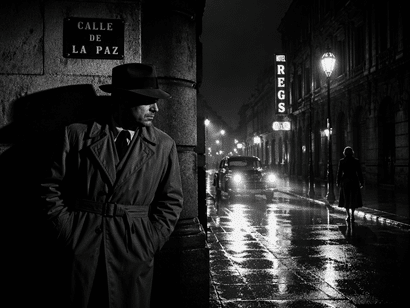
“Transform this urban cityscape photo into a painterly, impressionistic work of art. It should possess a discernible brush stroke texture, softened edges, and a warm yellow- and cool blue-dominated color palette like that of the artist Claude Monet.”
“Apply a dramatic noir black and white edit to this street photo. The output should incorporate stark shadows and high contrast, with piercingly bright highlights, to imbue a feeling of an old 1940s crime thriller.”
Top prompt mistakes when asking to edit photos
Every user, even an experienced one, will fall into these prompts when asking to use the best prompt for photo editing in chatgpt:
● Vague prompts: “Edit this picture nicely” provides nothing for the AI to work with.
● Contradictory requests: Asking for “natural skin tone” while saying “impeccable and perfected” leaves the AI to decide which request is more important and results in inconsistency.
● Failure to consider lighting consistency: Changing the background without defining that the light direction in the replacement needs to match results in an artificial composite.
● No sense of style or mood: Failing to provide an example of the mood or style requested gives the AI nothing but to provide one at random.
● Not refining prompts: Thinking that the first response is final is to miss out on a lot, with the following prompts and revisions always providing better results.
FAQs
What would be a good ChatGPT prompt for editing a photo for the first time?
Start by typing “Analyze the photo and provide me with three different options for improving the light and composition to make the photograph appear more professional”.
Can ChatGPT edit a RAW image file?
The program is currently best with high-quality JPEGs or PNGs, but it can describe how to properly utilize and adjust your RAW photo with external software.
How do I make the face of a person stay the same, and the background get changed?
Keep the subject person the same exact way and replace the background with a soft, blurry sunset over mountains.
Is there a limit on how many times I can edit my image?
While you can go through the image a couple of times, you can only make a significant edit on a single image once before performing major changes on another prompt in order to conserve the photograph.
Will my photo decrease in resolution when it is edited with an AI?
If your prompt includes “Keep the current sharpness and resolution of the image,” ChatGPT will actually optimize your image; some quality will be lost to compression during uploading and downloading.
Conclusion
Today, anyone with the ability to construct the proper prompt can edit like a professional. What makes the best prompt for photo editing in chatgpt is that it’s always founded on 3 key elements: clear, specific, and has an ideal picture in mind, whether it’s a bright, crisp product photograph, a moody portrait shoot, or even a particular stylistic change; the prompt determines the outcome. Now we are in Artificial Intelligence’s second year of true creative development and heading into 2026, prompt engineering will be an inevitable aspect of any professional creative’s toolset, so do not underestimate taking the time to learn this skill.